
This guide is designed to help you understand how subscriptions work within Zhylar, from getting started with a free account to upgrading, downgrading, renewing, or managing an existing subscription. It also covers important information related to payment terms, plan features, subscription expiry, and account access after a plan expires.
Whether you are exploring Zhylar for the first time or are already using the platform, this article will provide a clear overview of the available subscription options and the processes associated with them. It will also help you understand what to expect when changing plans, renewing your subscription, or transitioning to the Freemium Plan.
How to Access Zhylar
There are two ways users can access Zhylar:
Option 1: Free Sign-Up (Self-Service)
Users can start with a free trial directly from the login page.
How to Sign Up for Free
- Go to the Zhylar login page.
- Click on Create Account.
- Complete the registration process.
- Start using the Freemium plan.
This option allows users to explore Zhylar before moving to a paid subscription.
Option 2: Paid Subscription via Partner
Users cannot directly purchase paid subscriptions from within the Zhylar platform. To upgrade to a paid plan, you can get in touch with Zhylar Support, and they will assign you an authorized Zhylar Partner, who will guide you through the available subscription options and help activate the most suitable plan for your organization.
How Paid Subscription Works
- Contact Zhylar Support.
- Choose the required subscription plan.
- The partner will assign the selected plan & activate it to your account.
- You can then log in and start using the subscribed plan.
The partner will also handle all aspects of the onboarding process and set up your subscription with Zhylar.
Option 3: Existing Freemium User Upgrading to the Standard Plan
If you already have a Zhylar account under the Freemium Plan and would like access to additional features, higher limits, or premium functionality, you can upgrade your existing organization without creating a new account.
How to Upgrade from Freemium to Standard
- Contact your authorized Zhylar Partner.
- If a partner is not available, contact Zhylar Support via Email or WhatsApp.
- Discuss your requirements and select the appropriate subscription plan.
- Complete the subscription process.
- The Standard Plan will be assigned to your existing organization.
- All your existing data, records, contacts, and configurations will remain intact during the upgrade process.
Types of Plans Offered by Zhylar
Zhylar offers multiple subscription plans designed to support different business requirements and operational needs.
Currently, Zhylar offers the following plans:
Freemium Plan
You can revise that paragraph as follows:
The Freemium Plan allows users to access Zhylar at no cost and explore its core features. While most key functionalities are available, the Freemium Plan comes with predefined usage limits and capability caps on certain features. This plan is automatically assigned to users who register through the free self-sign-up process.
Additionally, users who choose to downgrade from a paid subscription or decide not to renew their existing plan may continue using Zhylar under the Freemium Plan, subject to the features and limits available within that plan.
Standard Plan
The Standard Plan is Zhylar’s paid subscription plan that allows users to have full access to the advanced features, higher usage limits, and enhanced functionality.
Standard Plan Pricing
- $9/user/month — billed monthly
- $6/user/month — billed annually
Paid subscriptions are assigned only through authorized Zhylar partners.
Subscription Tiers & Add-Ons
Zhylar may offer multiple subscription tiers, and add-ons. Features and usage limits may vary between plans, and certain functionalities may be modified, added, or removed over time as part of product improvements and business optimization.
Add-Ons
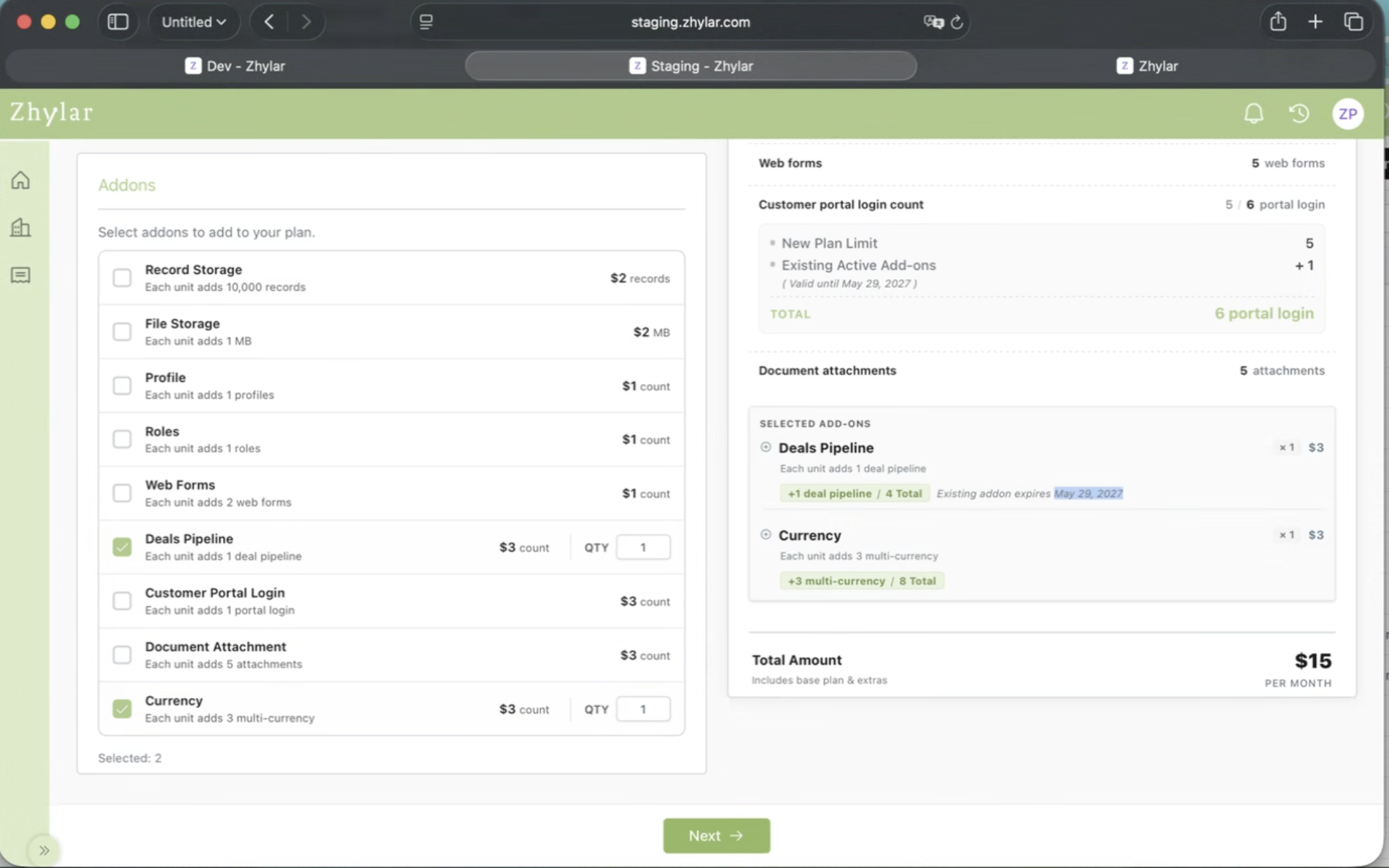
Add-Ons provide users with a way to increase their current usage limits without having to upgrade their entire subscription.
Example
A subscription will typically come with a fixed number of records by default. Rather than upgrade to a higher plan, a user can buy additional records separately, at an additional cost.
Currently, Zhylar provides the following Add-Ons as given below.
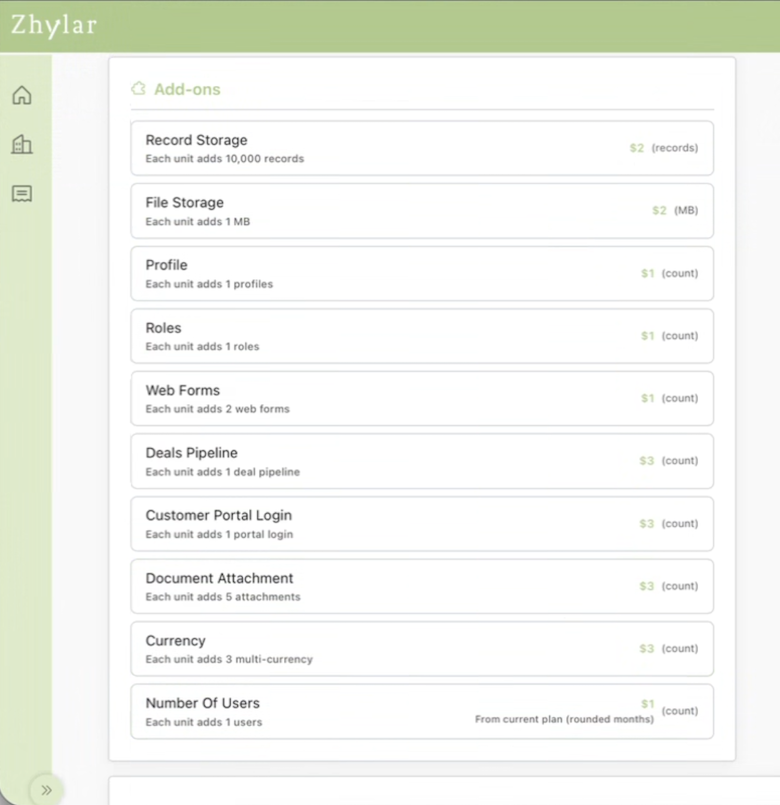
It is important to note that the pricing of add-ons will likely differ, depending on whether the subscription you are using is being billed either on a monthly or annual basis.
Billing Cycle & Payment Terms
Zhylar subscriptions may be billed on either:
- A monthly basis
- A yearly basis
The billing frequency will depend on what type of subscription the user chooses.
Users are responsible for maintaining valid payment details to avoid interruptions in service.
Accepted Payment Methods
Zhylar accepts the following methods of payment:
- Credit Cards
- Debit Cards
- Online Payment Gateways
If payment remains incomplete or fails beyond the due period, Zhylar reserves the right to temporarily suspend or restrict platform access until payment is successfully completed.
Users remain responsible for all applicable subscription charges, taxes, and payment liabilities.
Managing Your Subscription
During your subscription period, you may want to upgrade, downgrade, or manage your plan.
Upgrading Your Plan
If you are currently using the Freemium plan and want to move to a paid plan:
Steps to Upgrade
- Log in to your Zhylar account.
- Navigate to: Configuration > Subscription Details
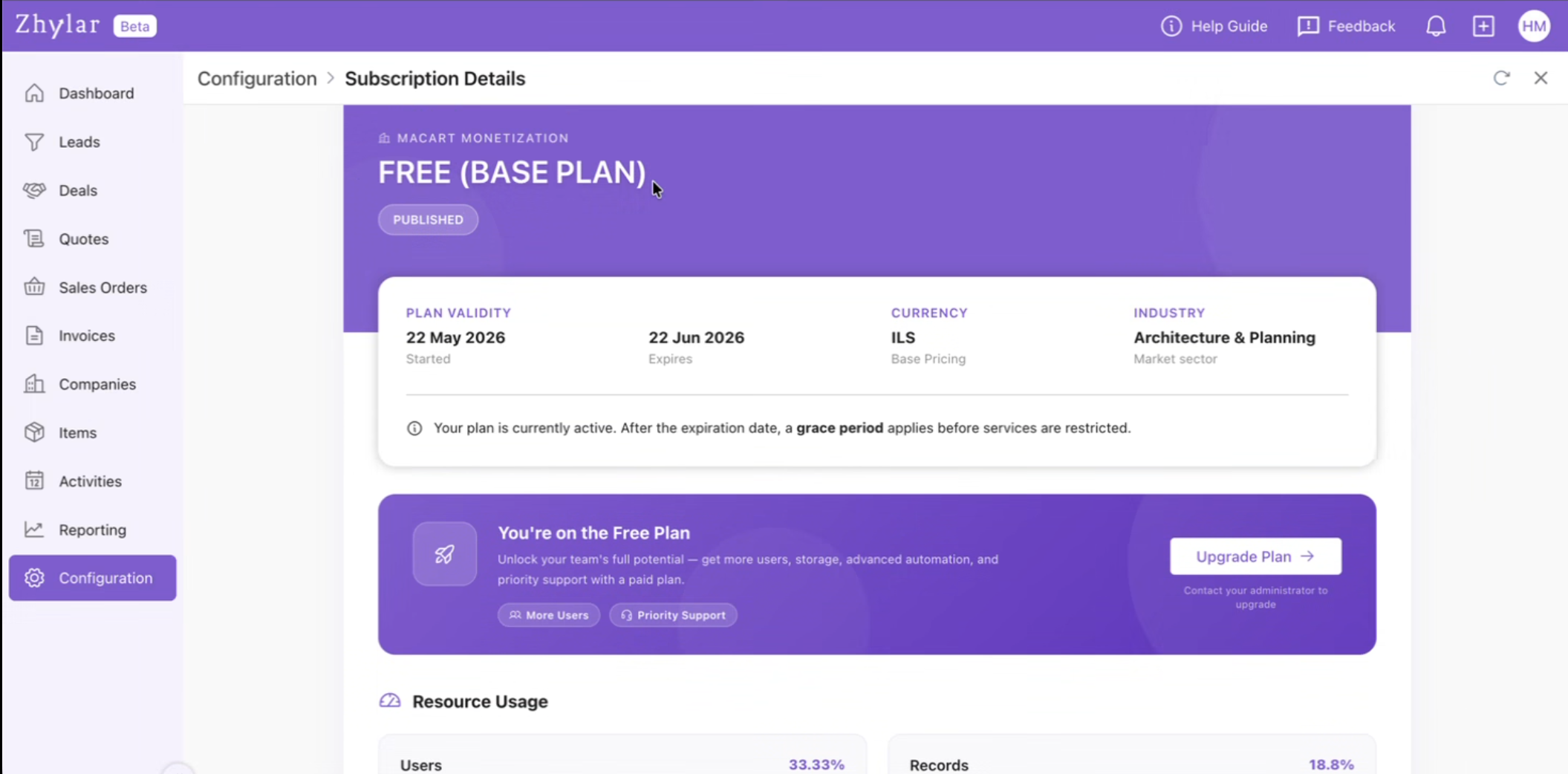
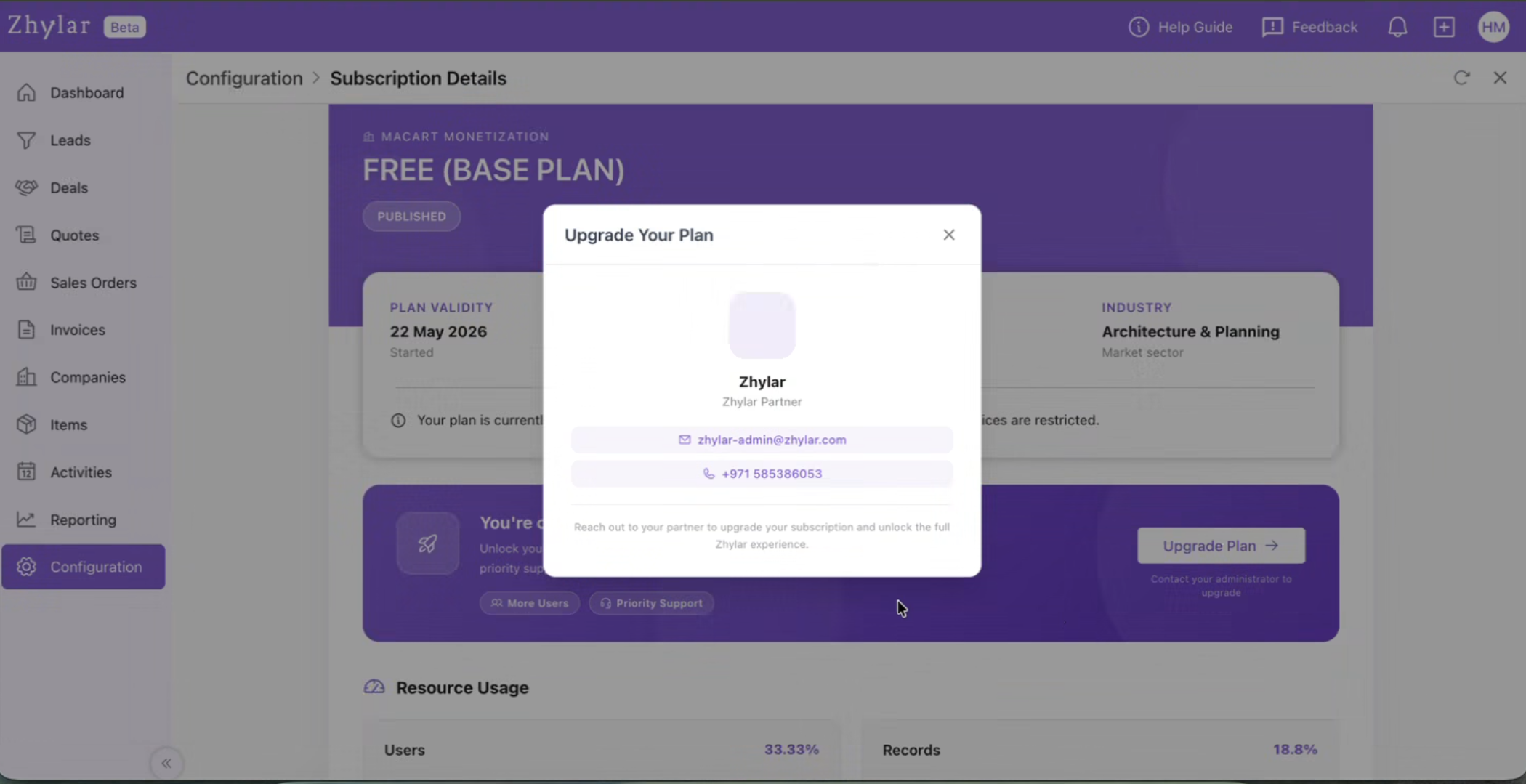
- Click on the Upgrade Plan button and it will display the Zhylar Partner details.
- Contact Zhylar Support.
- Inform them that you want to upgrade your subscription.
- The partner will handle the upgrade process.
Once completed, your account will be updated with the new plan and features.
Downgrading Your Plan
Users on a paid plan can move back to the free plan.
How Downgrading Works
Log in to your Zhylar account.
Navigate to: Configuration > Subscription Details
Click on the downgrade option.
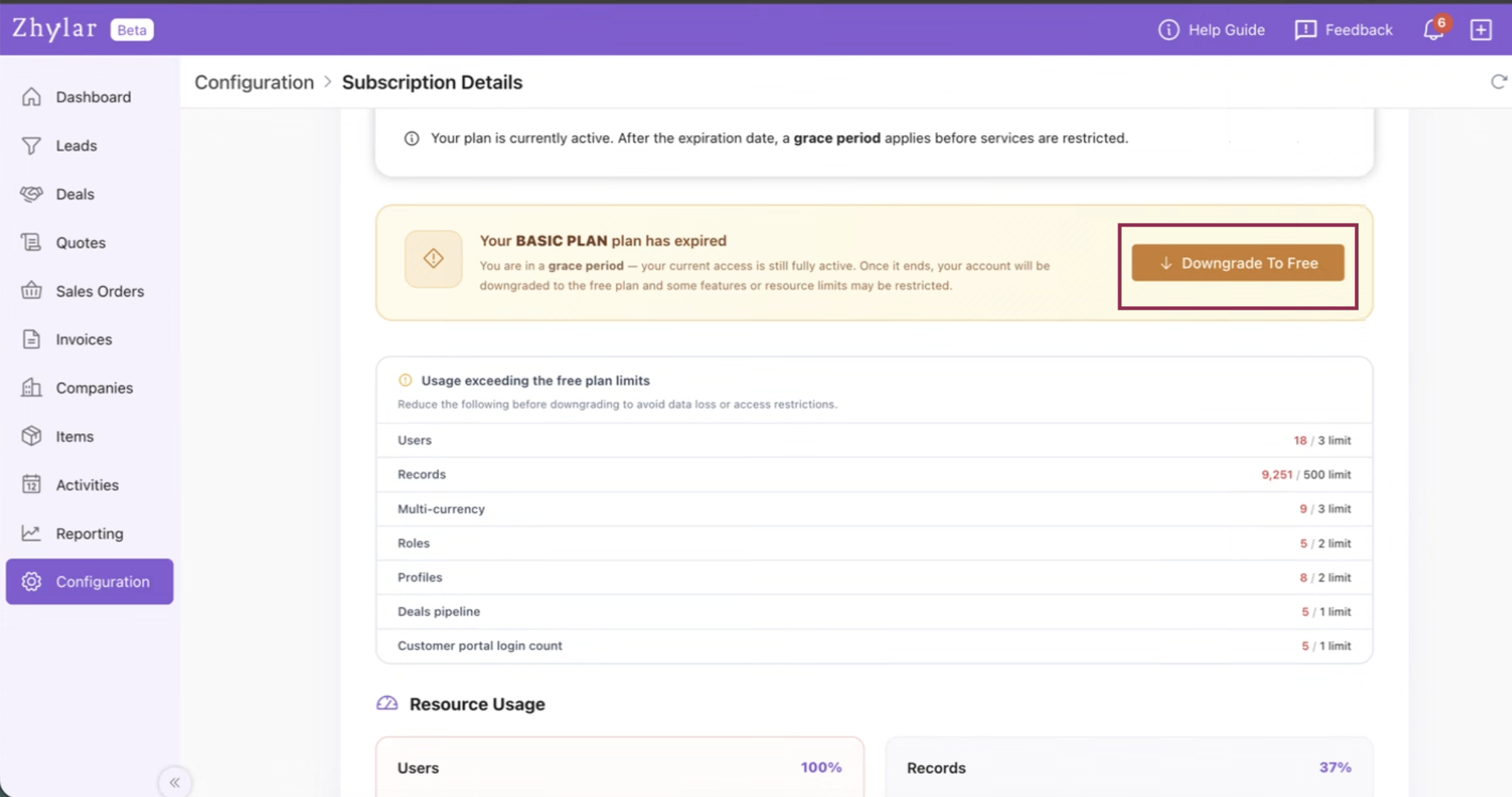
A confirmation screen will appear showing:
Your current plan usage
Features currently available
Features available in the free plan
Limitations after downgrade
Review the comparison carefully.
Confirm the downgrade request.
Once confirmed, your account will be moved to the free plan.
Important Note About Downgrades
Before downgrading, users will be informed about:
- Feature limitations
- Usage restrictions
- Data or functionality changes
It is also important to note that the downgrade is only possible if the parameters and usage limits are under or equal to freemium limits. Users can fit into these limits by deleting or inactivating records under that parameter.
This information helps users make an informed decision before switching plans.
Cancelling a Subscription
End users cannot directly cancel subscriptions.
How Cancellation Works
- Subscription cancellations are handled only by the partner.
- Partners can stop recurring billing for future renewals.
- Existing subscription periods cannot be shortened.
Refund Policy
Zhylar does not provide refunds for active subscription periods.
If recurring billing is cancelled:
- Your current subscription remains active until the expiry date.
- Access continues until the plan officially expires.
What Happens When Your Subscription Ends
Zhylar provides multiple reminders before your subscription expires.
However, in the case of Freemium plan, the plan will be auto-renewed by the system and does not need any action by the customer or the partner.
Expiry Notifications
Prior to subscription expiry, renewal reminders may be sent through:
- In-app notifications
- Email notifications
- Other system alerts
Renewal Timeline
- Yearly subscriptions → Notifications begin 15 days and 7 days before expiry
- Monthly subscriptions → Notifications begin 3 days before expiry
Important Renewal Information
Subscriptions must generally be renewed through the same channel from which they were originally purchased.
Example
- If purchased through a Channel Partner → Renewal must happen through the same Channel Partner.
- If purchased directly → Renewal may happen through Zhylar support or designated partners.
Grace Period After Expiry
Once the subscription expires, the account is moved to a Grace Period Plan.
During the grace period:
- Users remain on the same plan temporarily
- Existing data remains accessible
- Users can view their records
- Users can export/download their data
However, certain actions will be restricted.
Restrictions During Grace Period
The following actions will not work:
- Adding
- New records
- New Masters
- Importing New records
Following actions can be performed
- Login to the system
- Read
- Export (Existing Data)
- All limits are frozen as per the last
- Performing new operational activities
The account becomes view-only until the subscription is renewed.
For more detailed information about Zhylar subscriptions, and related policies, you may also refer to the Terms & Conditions (Points 11, 12 and 13) section available on Zhylar’s website.
Need Help Choosing a Plan?
For subscription-related assistance, upgrades, renewals, or billing support, please contact your Zhylar partner or email us at enquiry@zhylar.com or WhatsApp us at +971585386053.
Frequently Asked Questions (FAQs)
Q) Can I buy a paid subscription directly from Zhylar?
Here’s a revised version incorporating that point naturally:
No. Paid subscriptions cannot be purchased directly through the Zhylar platform. All paid subscriptions are typically managed through authorized Zhylar partners. If you would like to upgrade from a free plan or subscribe to a paid plan, you can contact a Zhylar partner, who will help you select and assign the most suitable subscription based on your business requirements. If a Zhylar partner is not available in your region, you may alternatively contact Zhylar Support or the Sales team through WhatsApp for assistance with plan selection, subscription activation, and onboarding.
Q) Can I start using Zhylar for free?
Yes. Users can start using Zhylar by signing up through the “Create Account” option available on the login page. Once the registration process is completed, a free organization will automatically be created and assigned the Freemium Plan. This allows users to explore the platform and use basic features without making any payment.
Q) I am currently using Zhylar under the beta program. How long will I continue to have free access?
As an existing beta user, you will continue to enjoy full access to all Zhylar features at no cost until 30th June 2026. This extended access period is being provided exclusively to users who joined the platform during the beta phase, allowing them additional time to explore and benefit from the complete Zhylar experience before the transition to the paid subscription model. After this date, an active subscription may be required to continue accessing premium features and functionality.
Q) How do I upgrade from a free plan?
To upgrade from a free plan to a paid subscription, you must connect with an authorized Zhylar partner. The partner will evaluate your requirements and assign the appropriate paid plan to your organization. Once the upgrade is completed, your account will gain access to the features, limits, and functionalities available under the selected subscription plan.
Q) Can I downgrade my paid plan?
Yes. Users can downgrade from a paid subscription plan to the free plan directly through the system. During the downgrade process, Zhylar will guide you through the required confirmation steps and explain the impact of moving to a lower plan, including any feature or usage limitations that may apply after the downgrade is completed.
Q) Can I cancel my subscription myself?
No. Subscription cancellation is handled through your authorized Zhylar partner. End users cannot directly cancel subscriptions from within the platform. If you no longer wish to continue your subscription, you will need to contact your partner, who can stop future recurring billing for your account.
Q) Will I get a refund if I cancel?
No. Zhylar does not provide refunds for active subscription periods. Even if recurring billing is cancelled, your subscription will remain active until the end of the current billing cycle. Users will continue to have access to their existing plan features until the official subscription expiry date.
Q) What happens after my subscription expires?
Once your subscription expires, your account will automatically move into a grace period. During this period, you will still be able to log in, access existing records, and export your data if required. However, certain operational actions such as creating invoices, adding masters, or creating new records will be restricted until the subscription is renewed or upgraded again.
Q) Will I receive expiry reminders?
Yes. Zhylar sends multiple subscription expiry reminders through in-app notifications, emails, and other system alerts to help users renew their subscriptions on time.
- For yearly subscriptions, notifications are sent starting 7 days before the expiry date.
- For monthly subscriptions, notifications are sent starting 3 days before the expiry date.
- These reminders are intended to help users avoid interruptions in access or functionality.