Import Leads

Importing leads in a CRM system involves bringing lead data into the CRM. This data includes names, contact details, and company information. Sources of this data include spreadsheets, CSV files, or other software. This enables businesses to quickly centralize all prospect information. They can do this in one secured Zhylar CRM system for organized tracking. Nurturing and conversion are also part of the process.
  • Log in to Zhylar
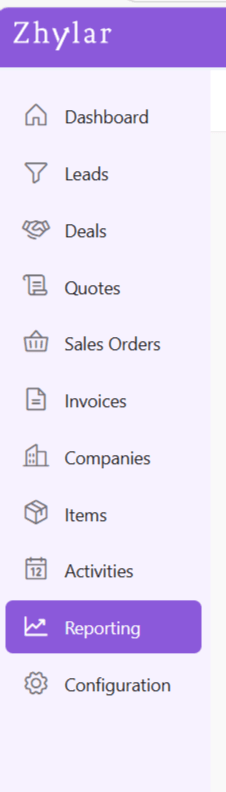
  • Go to Left-hand navigation panel
  • Click on Leads
  • The Leads list view will open.
  • From the top-right hand corner, click ⋮ 3 dots beside + New Lead
  • Click on Import Leads
  • You will be taken to a new page.
  • Upload a file in .xlsx format with the details of your leads.
  • If file is not ready, Download Template File from the right-hand corner.
  • Fill out the data in the filed provided.
  • All fields marked in * are mandatory.
  • For some fields, entry can be punched manually.
  • For others, such as country code, salutation and such, a drop-down arrow will be there. You can select one of the pre-filled values.
  • Once done, upload this file back in the space provided by clicking on the Upload File button.
  • Click Import Leads.
  • Your Leads will be added to the system.
  • From here, go to the Leads module directly by clicking on Go to Leads. Leads have been added to the list view.
  • In case there is an error with the file upload, simply click Replace File and try again.
Importing Leads is a quick way to add leads in bulk whilst avoiding any errors. Once your Leads have been imported, you can now proceed. Read about how to navigate through the Leads module at Zhylar.

Also Read

Web Forms General Settings Basic Terminologies  

Pipeline Management- Deals

A deal pipeline (or sales pipeline) is a visual way to track where each deal is in your sales process. It’s divided into stages — for example:
  • NewQualifiedProposal SentClosed Won/Closed Lost
By moving deals through these stages, teams can:
  • Make sure no opportunity gets forgotten
  • See exactly how close they are to closing
  • Spot bottlenecks in the process
  • Through the multiple pipeline feature, Zhylar offers a flexible approach to managing the sales cycle.
  • Create multiple pipelines for different workflows
  • Each pipeline has:
    • Custom fields
    • Tailored stages
    • Role-based access
  • You can navigate to the deals pipeline in two ways:
    • Go to the Left-hand navigation panel
    • Go to Configuration
    • Under “Pipelines”, select Deal Pipelines
  • Alternately, go to the Left-hand navigation panel
  • Go to Deals
  • Quick Access: Click ⚙️ on Deals page

Creating Pipelines

  • Using either of the two aforementioned ways, go to Deal Pipelines
  • Click “Add Pipeline”
  • Configure:
    • Stages: Add/rename as needed
    • Probabilities: Set win % per stage
    • Click Save

Probability Scoring

  • Stage Value = Potential deal amount. E.g., 1000 AED
  • Stage Probability = Likelihood of closing E.g., 10%

Stages in a Pipeline

In Zhylar, you can create several Deal Pipelines. Within those pipelines, you can create stags.
  • Each Pipeline has three default stages
    • New
    • Done
    • Lost
  • Users can add and customize stages as required.
  • Click Add Deal Stage to add a new stage.
  • Give the stage a name.
  • You can shuffle the position of the stages that you add via drag and drop method.

Delete Added Stage

Users can only delete stages they have added, i.e., Default stages cannot be deleted. To delete,
  • Click on the red cross.
  • You will be asked to transfer any existing leads from this stage to another stage.
  • Once done, you can proceed to delete the stage.
Purpose
  • Prioritizes deals with higher probability of conversion
  • Focus on deals that generate more revenue, i.e., targeted effort
  • Take action on deals that require follow-up
  • Forecasts realistic revenue through probability and weighted value
  • Visualize the complete deal cycle as well as the position of each deal in the cycle.
Read all about the complete Deals Module before you proceed.

Also Read

Units of Measurement General Settings Basic Terminologies  

Why You Need Zhylar — Your Sales Assistant from Prospect to Payment 

In every growing business, sales teams often face the same challenges. They deal with scattered leads and disconnected systems. Missed follow-ups and endless manual work are also common issues. As business expands, so does the chaos – this is where Zhylar steps in– a powerful sales enablement CRM that unifies your entire sales process making it easier, faster, and smarter to move from prospect to payment. Zhylar isn’t just another CRM, it’s your team’s sales assistant:
  • It helps you streamline operations.
  • It enhances collaboration.
  • It allows you to close deals efficiently.
All of this is done from one centralized workspace. Whether you’re a business owner tracking business growth, a manager who is monitoring team performance, or you’re a Sales Rep chasing targets; Zhylar caters to all your needs. It is built to make every part of your sales journey smoother.

Lead management  

Leads often come from multiple sources — websites, webforms, campaigns, cold calls and emails. Zhylar automatically captures and organizes these leads in one place. No more juggling spreadsheets or digging through emails. Assign leads to your team, track progress, and nurture relationships until they convert into paying customers.

Deal management 

Once a lead becomes qualified, Zhylar helps you convert it into a Deal with complete visibility of its journey. Using the Deal Pipeline, you can track where each opportunity stands — from New to Closed Won. Add deal values, expected close dates, and related contacts, and Zhylar ensures nothing falls through the cracks. This structured view keeps your team focused and helps you close deals faster.

Activity and communication tracking  

Zhylar takes the stress out of task management. Create, assign, and monitor follow-ups, calls, and meetings directly linked to your deals. With Email Integration, every conversation is stored within the CRM, giving you a 360° view of client communication. That means no missed follow-ups, no scattered messages — just smooth, organized workflows.
https://www.youtube.com/watch?v=CaHQr5NbEsE

Quote and Invoice management  

Customer needs evolve, and Zhylar evolves with them. Create and revise quotes quickly, maintaining clear version control. When deals close, generate invoices instantly in your preferred currency. Keep track of payments all in one place. From quote generation to payment collection, Zhylar ensures a hassle-free experience.

Analytics and dashboards  

With Zhylar’s interactive dashboard, you can monitor KPIs, team performance, and deal with conversions in real time. Deep reports help you identify what’s working. They show where improvements are needed enabling faster, data-driven decisions that fuel revenue growth.
Zhylar offers everything your business needs. It manages the complete sales lifecycle from the first lead to the final payment. It removes inefficiencies, improves visibility, and helps teams work smarter. If you’re ready to transform your sales operations, take action now. Accelerate revenue growth by signing up for free on Zhylar today. Let your sales take flight. Also Read  

7 Benefits of Implementing a CPQ Solution

In today’s competitive business landscape, companies need to constantly look for ways to streamline their processes and improve efficiency. One tool that can significantly help in this regard is a CPQ (Configure, Price, Quote) solution. CPQ software helps businesses automate their sales processes. It enables them to quickly generate accurate quotes.
This reduces errors and improves overall sales performance. There are several reasons why a business can benefit from implementing a CPQ solution. Let’s outline the top seven reasons why businesses should consider using CPQ software.

7 Reasons Why a Business Needs a CPQ Solution

Streamline Your Sales Process 

First and foremost, a CPQ solution can help businesses streamline their sales process. Automation of configuration, pricing, and quoting of products and services helps businesses. It eliminates manual tasks. It also reduces the time it takes to create a quote. This can lead to quicker turnaround times for customers, ultimately improving customer satisfaction and increasing sales.

Improve Your Quotes 

Secondly, CPQ software can help businesses improve the accuracy of their quotes. When product and pricing information is centralized in a single platform, businesses ensure that sales reps always offer the most up-to-date pricing. This centralization helps sales reps provide accurate pricing to customers. They also provide the most accurate pricing to customers. This can help eliminate pricing errors and discrepancies, leading to more consistent and reliable quotes.

Upsell + Cross-Sell 

Another benefit of CPQ software is its ability to help businesses upsell and cross-sell products. CPQ software provides sales reps with real-time insights into product recommendations and pricing options. This helps them identify opportunities to sell additional products or services to customers. This can help businesses increase their average deal size and drive in more revenue.

Optimize Pricing to Maximize Profitability 

Furthermore, a CPQ solution can help businesses improve their pricing strategies. By analyzing historical sales data and market trends, CPQ software can help businesses optimize their pricing to maximize profitability. This can help businesses stay competitive in the market. It ensures they get the most value out of each deal.

Optimize Sales Performance 

Additionally, CPQ software can help businesses improve their overall sales performance. CPQ software provides sales reps with guided selling tools and templates. These tools help them navigate complex sales processes more effectively. This can help reps better understand customer needs, tailor their sales approach, and ultimately close more deals.

Streamline Quote to Cash Process  

Moreover, a CPQ solution can help businesses improve their quote-to-cash process. By integrating CPQ software with other business systems such as CRM and ERP, businesses can streamline their sales process. This integration enhances the journey from quote creation to order fulfilment. This can help businesses reduce errors, cut down on manual tasks, and improve overall operational efficiency.

Valuable Insights for Analysis 

Lastly, implementing a CPQ solution can help businesses gain valuable insights into their sales performance. By tracking key metrics such as quote conversion rates, win rates, and sales velocity, businesses can identify areas for improvement. They can make data-driven decisions to optimize their sales process. This can help businesses stay ahead of the competition and drive greater success in the market.

Conclusion 

In conclusion, a CPQ solution offers numerous benefits for businesses. It helps those looking to enhance their sales processes. It can also increase revenue. CPQ software streamlines sales operations and optimizes pricing strategies. It gains valuable insights. These capabilities empower businesses to elevate their sales performance. They also help maintain a competitive edge in the market. Therefore, businesses must explore implementing a CPQ solution. This is necessary to capitalize on these advantages. Doing so ensures long-term success.
 
Zhylar CRM

From inquiry to invoice: How automation streamlines your sales cycle

Introduction

Managing a sales cycle manually can be overwhelming. From capturing leads to sending invoices, every stage requires precision, timely follow-ups, and seamless coordination. The traditional approach often leads to inefficiencies, missed opportunities, and delayed payments. Automation is transforming sales processes by reducing manual effort, eliminating errors, and accelerating deal closures. By using a robust CRM and CPQ system, businesses can enhance their sales journey. This improvement spans from the first customer inquiry to the final invoice.

The challenges of a manual sales cycle

Many businesses struggle with an unstructured sales process that leads to inefficiencies such as:
  • Missed follow-ups: Without automation, sales teams often forget to follow up on leads, reducing conversion rates.
  • Data inconsistencies: Manually updating customer information can result in errors, leading to miscommunication.
  • Time-consuming approvals: Pricing, discounts, and proposal approvals often require back-and-forth discussions, slowing down the sales process.
  • Delayed invoicing: Generating invoices manually can lead to billing errors and payment delays, affecting cash flow.

How automation streamlines the sales cycle

Automation enhances each stage of the sales cycle, ensuring a smooth transition from inquiry to invoice. Let’s break it down step by step:

1. Lead capture and qualification

Manually entering and tracking leads can be time-consuming. Automation helps by:
  • Capturing leads instantly from web forms, emails, and social media.
  • Scoring and qualifying leads based on predefined criteria, ensuring sales teams focus on high-potential prospects.
  • Automatically assigning leads to the right salesperson for quicker engagement.

2. Efficient deal and quote management

Once a lead is converted into a deal, automation ensures a streamlined workflow:
  • Pre-configured sales pipelines guide teams through each stage of the deal.
  • Automated pricing and discount approvals eliminate bottlenecks in CPQ processes.
  • Generating professional quotes in just a few clicks, reducing turnaround time.

3. Sales order creation and approval

Once a customer accepts a quote, automation speeds up order processing:
  • One-click conversion of quotes to sales orders eliminates redundant data entry.
  • Automated approval workflows ensure orders are reviewed and processed without delays.
  • Error-free order documentation improves accuracy and compliance.

4. Seamless invoice generation and payment tracking

Getting paid on time is crucial for any business. Automation helps by:
  • Auto-generating invoices based on approved sales orders, reducing manual effort.
  • Tracking due payments and sending automated payment reminders to customers.
  • Integrating with accounting tools like QuickBooks and Zoho Books for better financial management.

Why Zhylar is the ideal solution

At Zhylar, we understand the challenges of managing a sales cycle manually. That’s why we’ve built a powerful CRM + CPQ solution that:
  • Automates lead capture, deal tracking, and quote generation.
  • Offers seamless approval workflows to speed up sales orders.
  • Generates invoices instantly and integrates with accounting platforms.
  • Enhances efficiency with an intuitive interface and smart automation tools.
By using Zhylar, businesses can eliminate repetitive tasks, close deals faster, and maintain strong customer relationships—all while boosting revenue. Ready to transform your sales cycle? Let’s make it happen with Zhylar!
Zhylar CRM
Zhylar – top CRM solutions

Quote Revision

Quote revision lets you update or modify an existing quote when customer requirements change. You don’t need to start from scratch. You can duplicate the original quote and adjust it. This keeps track of all versions in one place. This ensures transparency, faster negotiations, and makes it easier to finalise and convert the approved quote into a sales order. In the Zhylar system, please note:
  • Only a quote in sent stage can be revised.
  • Open Sent quote
  • Click Create Revision
  • Make changes
  • Update Quote (save draft)
  • Save & Send (resend)
  • Revised versions will be denoted by R# following the document series code.
  • E.g., quote document with ID QT-0007 is revised thrice, the revised documents will be saved as:
    • QT-0007- R1
    • QT-0007-R2
    • QT-0007- R3
  • Quotes List View only shows the latest active version. Example: Accepted/Sent quotes appear.
  • All other versions will be moved to archive.
  • You can switch between quote versions in Quotes View tab.
  • To see all versions:
    • Go to Companies.
    • Click the relevant company.
    • Select the Quotes tab.
    • View all versions in list view
  • This is done to avoid clutter in main list.

Also Read

Quotes Sales Orders  

Transform Your Sales Cycle: Inquiry to Invoice Simplified

Introduction

Managing a sales cycle manually can be overwhelming. From capturing leads to sending invoices, every stage requires precision, timely follow-ups, and seamless coordination. The traditional approach often leads to inefficiencies, missed opportunities, and delayed payments. Automation is transforming sales processes by reducing manual effort, eliminating errors, and accelerating deal closures. Businesses can streamline their entire sales journey by leveraging a robust CRM and CPQ system. This spans from the first customer inquiry to the final invoice.

The challenges of a manual sales cycle

Many businesses struggle with an unstructured sales process that leads to inefficiencies such as:
  • Missed follow-ups: Without automation, sales teams often forget to follow up on leads, reducing conversion rates.
  • Data inconsistencies: Manually updating customer information can result in errors, leading to miscommunication.
  • Time-consuming approvals: Pricing, discounts, and proposal approvals often require back-and-forth discussions, slowing down the sales process.
  • Delayed invoicing: Generating invoices manually can lead to billing errors and payment delays, affecting cash flow.

How automation streamlines the sales cycle

Automation enhances each stage of the sales cycle, ensuring a smooth transition from inquiry to invoice. Let’s break it down step by step:

1. Lead capture and qualification

Manually entering and tracking leads can be time-consuming. Automation helps by:
  • Capturing leads instantly from web forms, emails, and social media.
  • Scoring and qualifying leads based on predefined criteria, ensuring sales teams focus on high-potential prospects.
  • Automatically assigning leads to the right salesperson for quicker engagement.

2. Efficient deal and quote management

Once a lead is converted into a deal, automation ensures a streamlined workflow:
  • Pre-configured sales pipelines guide teams through each stage of the deal.
  • Automated pricing and discount approvals eliminate bottlenecks in CPQ processes.
  • Generating professional quotes in just a few clicks, reducing turnaround time.

3. Sales order creation and approval

Once a customer accepts a quote, automation speeds up order processing:
  • One-click conversion of quotes to sales orders eliminates redundant data entry.
  • Automated approval workflows ensure orders are reviewed and processed without delays.
  • Error-free order documentation improves accuracy and compliance.

4. Seamless invoice generation and payment tracking

Getting paid on time is crucial for any business. Automation helps by:
  • Auto-generating invoices based on approved sales orders, reducing manual effort.
  • Tracking due payments and sending automated payment reminders to customers.
  • Integrating with accounting tools like QuickBooks and Zoho Books for better financial management.

Why Zhylar is the ideal solution

At Zhylar, we understand the challenges of managing a sales cycle manually. That’s why we’ve built a powerful CRM + CPQ solution that:
  • Automates lead capture, deal tracking, and quote generation.
  • Offers seamless approval workflows to speed up sales orders.
  • Generates invoices instantly and integrates with accounting platforms.
  • Enhances efficiency with an intuitive interface and smart automation tools.
By using Zhylar, businesses can eliminate repetitive tasks, close deals faster, and maintain strong customer relationships—all while boosting revenue. Ready to transform your sales cycle? Let’s make it happen with Zhylar!