In CRM, a deal is a sales opportunity — a chance to sell your product or service and earn revenue. A deal record stores key details like:
Deal value (how much it’s worth)
Expected close date (when you aim to win it)
Linked contacts (people you’re selling to)
Products or services offered
Tracking deals in the CRM helps sales teams stay organized. It ensures they follow up on time. It also moves opportunities forward until they’re won or lost.
What is a Deal Pipeline?
In Zhylar, a deal pipeline is a visual framework. It maps each stage of your sales process, from opportunity creation to closure. Pipeline management empowers you to track progress, identify stalled deals, and forecast revenue accurately.
Deals View
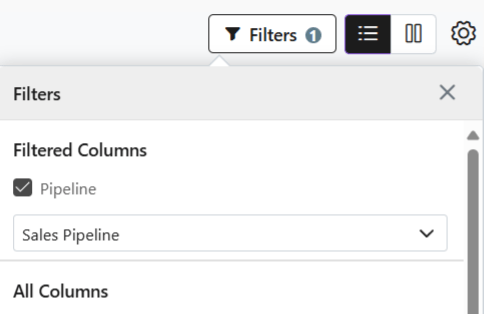
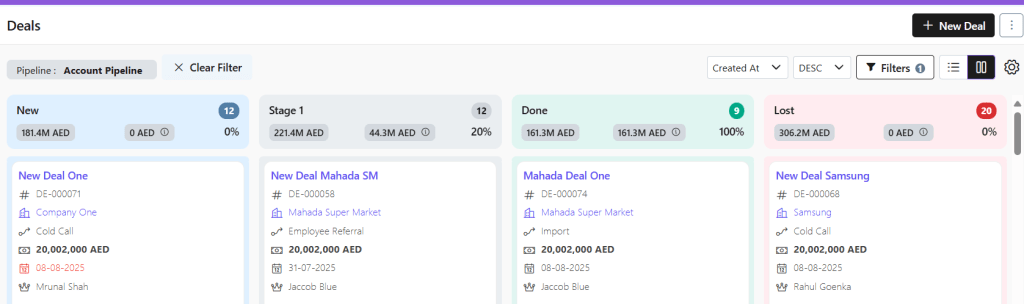
When viewing the deals added to the system, the list will show deals in one particular pipeline at a time.
Switch between pipelines to check deals.
Click on Filters
Select Pipeline
Select the required pipeline
Kanban View
Visual Pipeline Tracking – See deal stages at a glance with color-coded cards
Drag-and-Drop Simplicity – Move deals between stages instantly
Quick Status Checks – Identify bottlenecks or stalled deals visually
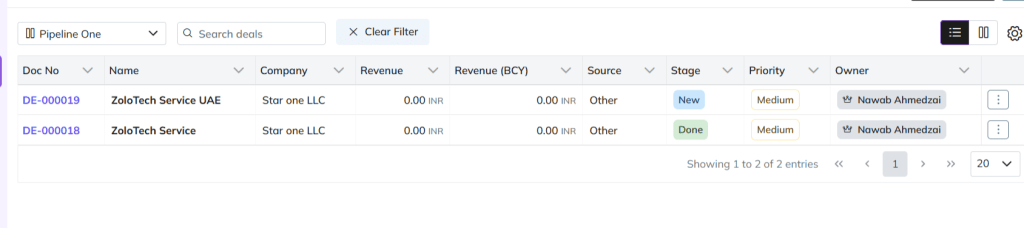
List View
Switch to list view if required.
Detailed Data Overview – View all deal info (value, dates, contacts) in one table
Sorting & Filtering – Organize by amount, close date, or custom fields
Add New Deal
There are three ways to add a new deal to Zhylar.
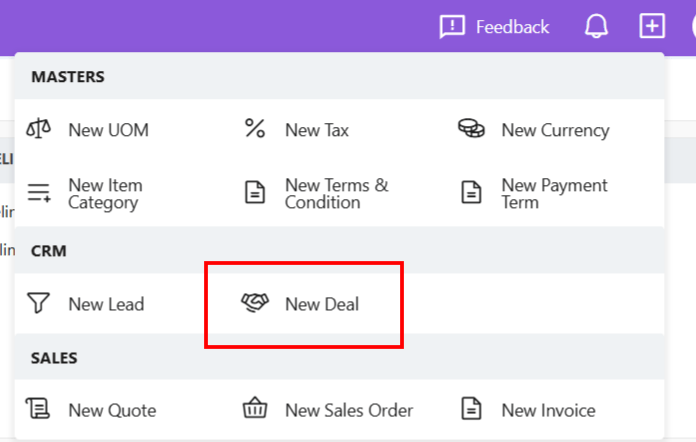
Shortcut
Click + New Deal (top-right)
Fill details
Click Add Deal
Deals Module
Go to Dashboard
From the left-hand panel, go to Deals
Click + New Deal
Fill details.
Save.
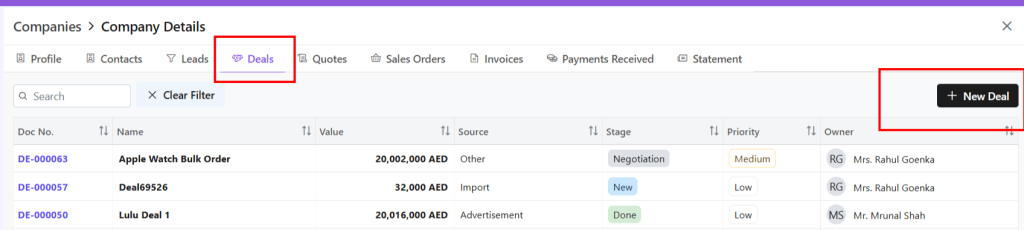
From Companies
From the left-hand panel, go to Companies
Go to Company Details
Click on the Deals tab
Select + New Deal
Deal Details
Deal Actions
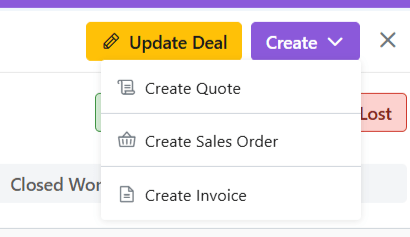
When you click open a deal, you can;
View deal details
Edit deal– Make required changes
Email deal– The deal can be mailed to client
View Company– Get a wholistic view of the company linked to this deal with one click.
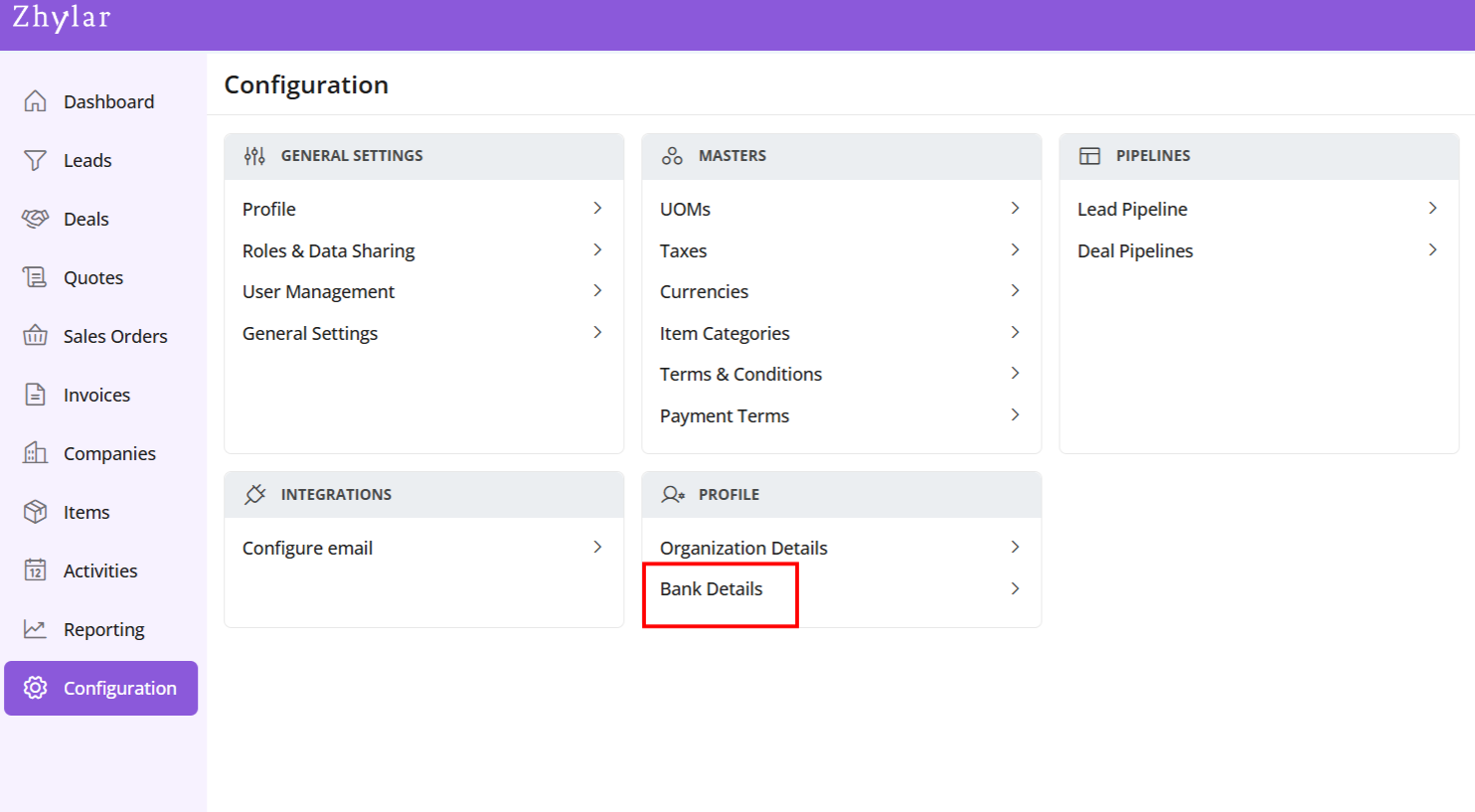
In a CRM system, bank details refer to the financial information of customers, vendors, or partners. This information is utilized for billing, invoicing, refunds, and financial transactions within the platform.
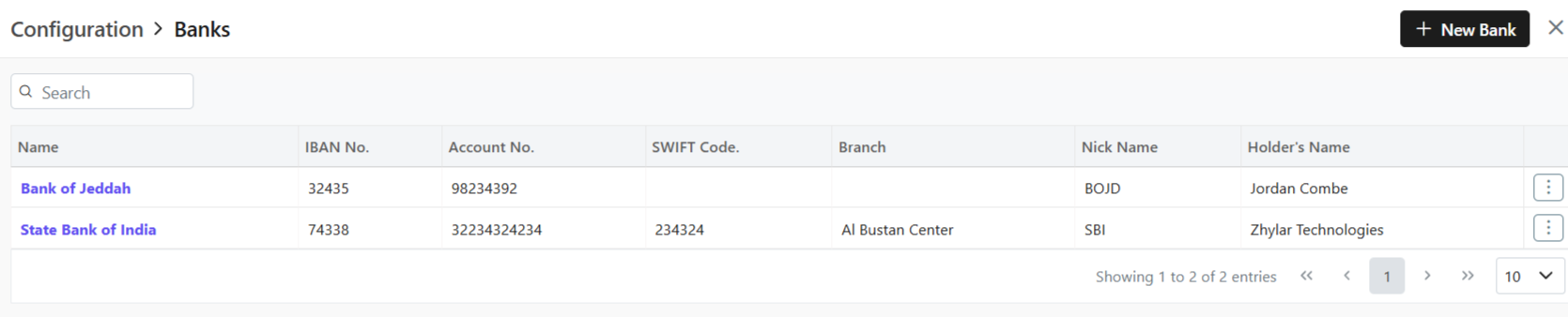
In Zhylar CRM, a primary bank is the default account managing payments, refunds, and transactions.
This bank will be loaded by default in all the Add Invoice forms.
You can switch the Bank in the document if required.
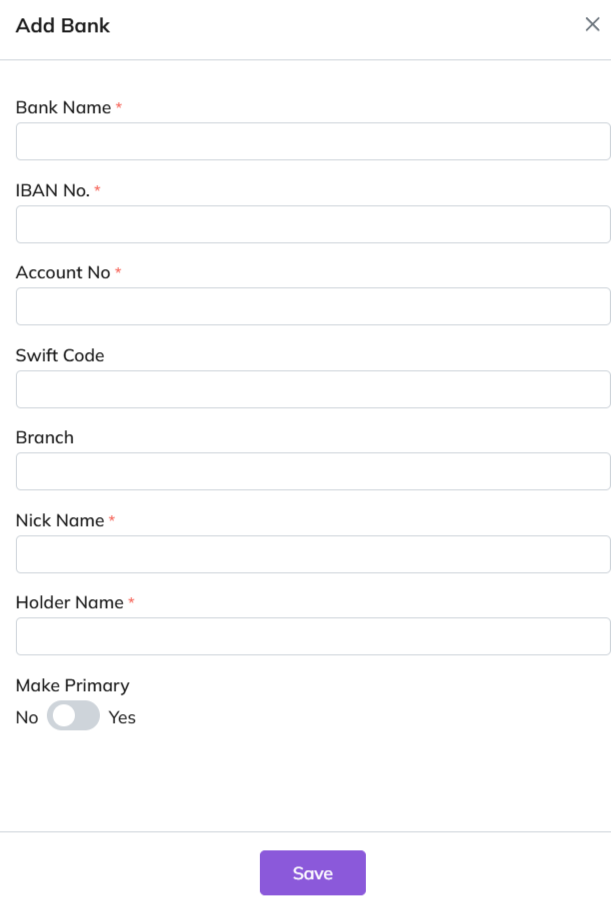
Add New Bank
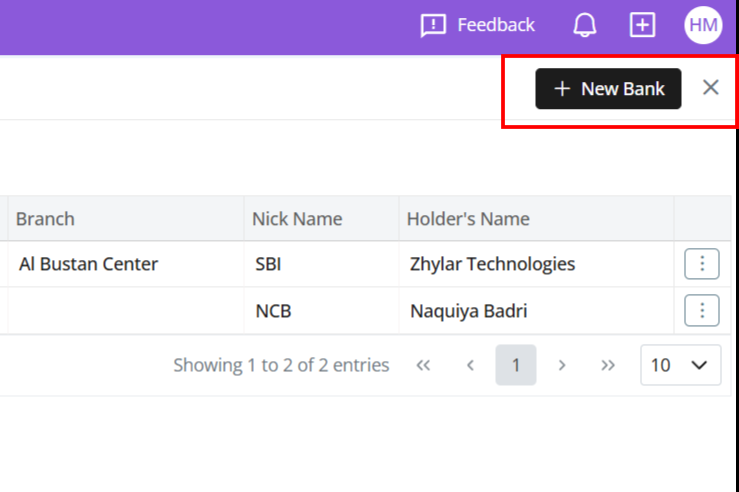
Click + New Bank.
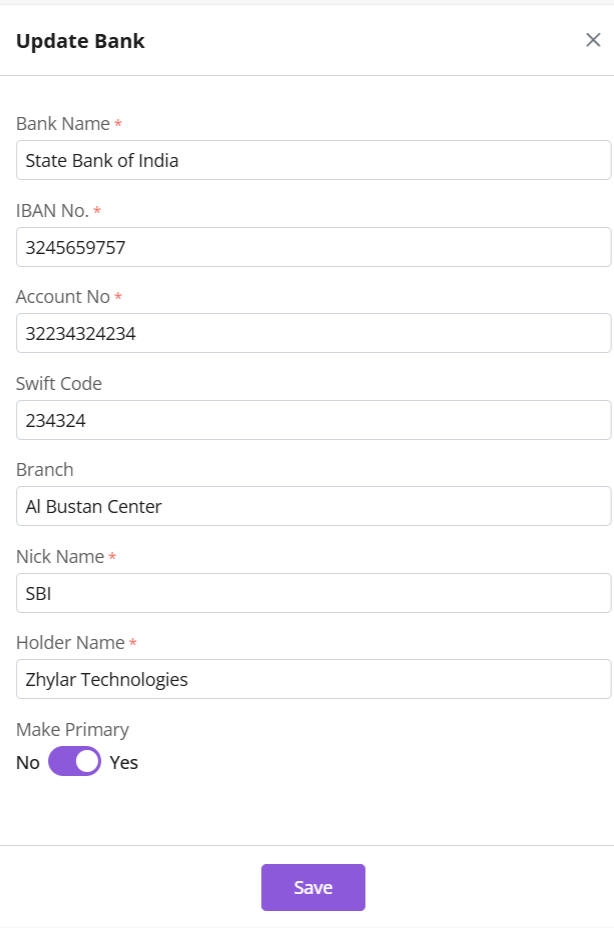
Fill out the details.
Fill required data.
Click Save.
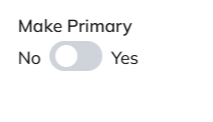
Primary Bank
Toggle to mark as primary.
Only one primary bank allowed.
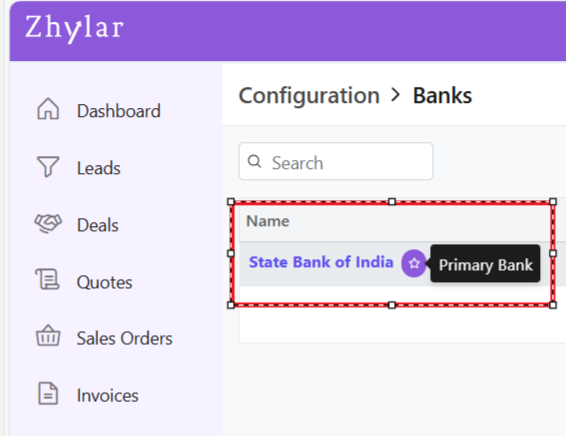
Primary bank denoted by a white star in a purple circle.
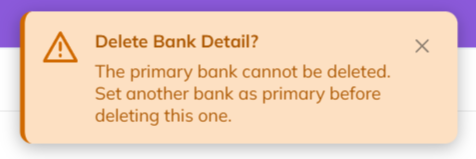
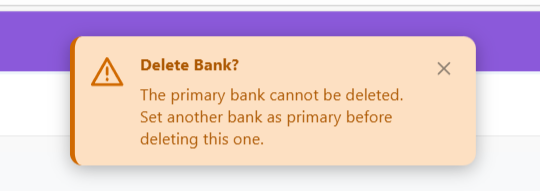
A primary bank cannot be deleted.
Bank Nick Name
When a bank is added to any document, the field drop down will carry the bank’s nick name.
E.g., Dubai National Bank- Al-Nahda branch -> Nickname: DNB Al-Nahda
Thus drop down will show “DNB Al-Nahada” as an option.
Update Bank
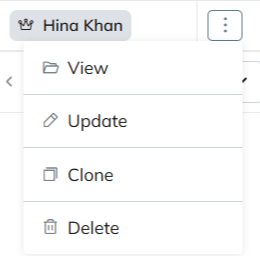
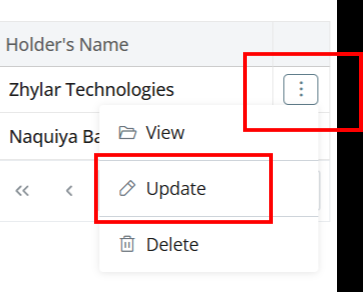
Click ⋮ 3 dots
Select Update.
Edit details.
Save changes.
Delete Bank
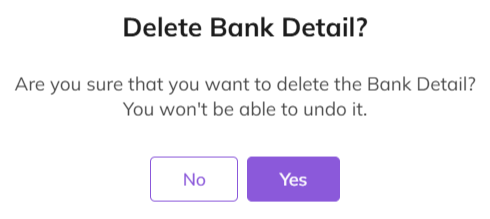
Click ⋮ > Delete.
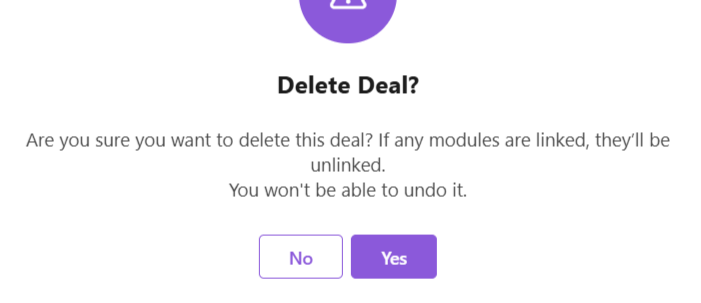
Confirm with Yes.
Note:
Action cannot be undone.
A bank marked as primary cannot be deleted.
Two banks can not have the same Nick Name.
Payment Receipt
Navigate to Invoice
Go to Dashboard
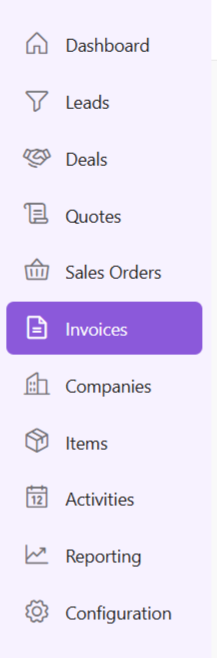
From the left-hand navigation panel, go to Invoices
Select Invoice:
Open the relevant invoice.
Invoice must be in Sent status or any of the successive stages.
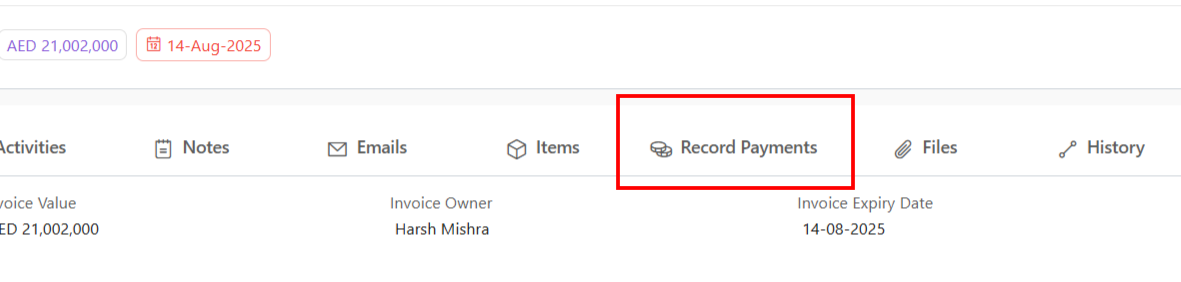
Record Payment:
Click “Record Payment”
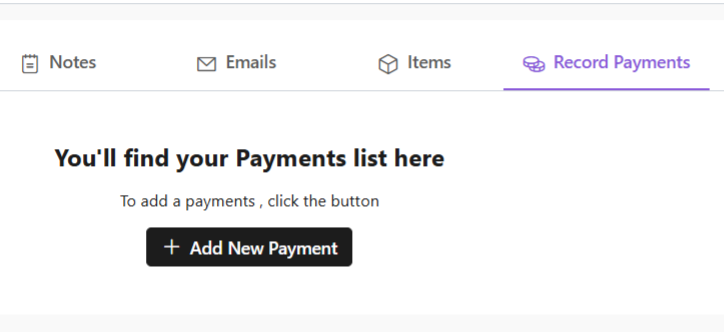
You’ll find your Payments list.
Add New Payment:
Click “+ Add New Payment”
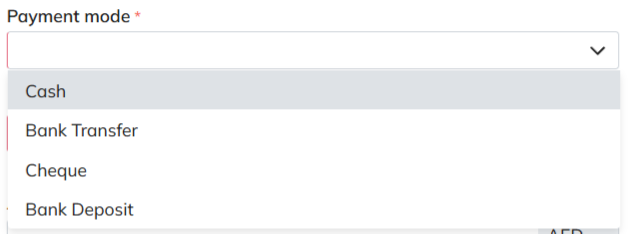
Fill required details.
When selecting mode of payment, except cash, all other payment modes will require you to add a bank.
Under “deposit to” field, add your bank.
If payment is being made in cash, you will not have to add a bank.
Fill data and click “Add Payment”.
Your payment receipt will be added.
Discover how Zhylar can streamline your sales and elevate your business processes. Visit our website or book a demo today to experience the difference!
Managing a sales cycle manually can be overwhelming. From capturing leads to sending invoices, every stage requires precision, timely follow-ups, and seamless coordination. The traditional approach often leads to inefficiencies, missed opportunities, and delayed payments.
Automation is transforming sales processes by reducing manual effort, eliminating errors, and accelerating deal closures. By using a robust CRM and CPQ system, businesses can enhance their sales journey. This improvement spans from the first customer inquiry to the final invoice.
The challenges of a manual sales cycle
Many businesses struggle with an unstructured sales process that leads to inefficiencies such as:
Missed follow-ups: Without automation, sales teams often forget to follow up on leads, reducing conversion rates.
Data inconsistencies: Manually updating customer information can result in errors, leading to miscommunication.
Time-consuming approvals: Pricing, discounts, and proposal approvals often require back-and-forth discussions, slowing down the sales process.
Delayed invoicing: Generating invoices manually can lead to billing errors and payment delays, affecting cash flow.
How automation streamlines the sales cycle
Automation enhances each stage of the sales cycle, ensuring a smooth transition from inquiry to invoice. Let’s break it down step by step:
1. Lead capture and qualification
Manually entering and tracking leads can be time-consuming. Automation helps by:
Capturing leads instantly from web forms, emails, and social media.
Scoring and qualifying leads based on predefined criteria, ensuring sales teams focus on high-potential prospects.
Automatically assigning leads to the right salesperson for quicker engagement.
2. Efficient deal and quote management
Once a lead is converted into a deal, automation ensures a streamlined workflow:
Pre-configured sales pipelines guide teams through each stage of the deal.
Automated pricing and discount approvals eliminate bottlenecks in CPQ processes.
Generating professional quotes in just a few clicks, reducing turnaround time.
3. Sales order creation and approval
Once a customer accepts a quote, automation speeds up order processing:
One-click conversion of quotes to sales orders eliminates redundant data entry.
Automated approval workflows ensure orders are reviewed and processed without delays.
Error-free order documentation improves accuracy and compliance.
4. Seamless invoice generation and payment tracking
Getting paid on time is crucial for any business. Automation helps by:
Auto-generating invoices based on approved sales orders, reducing manual effort.
Tracking due payments and sending automated payment reminders to customers.
Integrating with accounting tools like QuickBooks and Zoho Books for better financial management.
Why Zhylar is the ideal solution
At Zhylar, we understand the challenges of managing a sales cycle manually. That’s why we’ve built a powerful CRM + CPQ solution that:
Automates lead capture, deal tracking, and quote generation.
Offers seamless approval workflows to speed up sales orders.
Generates invoices instantly and integrates with accounting platforms.
Enhances efficiency with an intuitive interface and smart automation tools.
By using Zhylar, businesses can eliminate repetitive tasks, close deals faster, and maintain strong customer relationships—all while boosting revenue. Ready to transform your sales cycle? Let’s make it happen with Zhylar!
Managing a sales cycle manually can be overwhelming. From capturing leads to sending invoices, every stage requires precision, timely follow-ups, and seamless coordination. The traditional approach often leads to inefficiencies, missed opportunities, and delayed payments.
Automation is transforming sales processes by reducing manual effort, eliminating errors, and accelerating deal closures. Businesses can streamline their entire sales journey by leveraging a robust CRM and CPQ system. This spans from the first customer inquiry to the final invoice.
The challenges of a manual sales cycle
Many businesses struggle with an unstructured sales process that leads to inefficiencies such as:
Missed follow-ups: Without automation, sales teams often forget to follow up on leads, reducing conversion rates.
Data inconsistencies: Manually updating customer information can result in errors, leading to miscommunication.
Time-consuming approvals: Pricing, discounts, and proposal approvals often require back-and-forth discussions, slowing down the sales process.
Delayed invoicing: Generating invoices manually can lead to billing errors and payment delays, affecting cash flow.
How automation streamlines the sales cycle
Automation enhances each stage of the sales cycle, ensuring a smooth transition from inquiry to invoice. Let’s break it down step by step:
1. Lead capture and qualification
Manually entering and tracking leads can be time-consuming. Automation helps by:
Capturing leads instantly from web forms, emails, and social media.
Scoring and qualifying leads based on predefined criteria, ensuring sales teams focus on high-potential prospects.
Automatically assigning leads to the right salesperson for quicker engagement.
2. Efficient deal and quote management
Once a lead is converted into a deal, automation ensures a streamlined workflow:
Pre-configured sales pipelines guide teams through each stage of the deal.
Automated pricing and discount approvals eliminate bottlenecks in CPQ processes.
Generating professional quotes in just a few clicks, reducing turnaround time.
3. Sales order creation and approval
Once a customer accepts a quote, automation speeds up order processing:
One-click conversion of quotes to sales orders eliminates redundant data entry.
Automated approval workflows ensure orders are reviewed and processed without delays.
Error-free order documentation improves accuracy and compliance.
4. Seamless invoice generation and payment tracking
Getting paid on time is crucial for any business. Automation helps by:
Auto-generating invoices based on approved sales orders, reducing manual effort.
Tracking due payments and sending automated payment reminders to customers.
Integrating with accounting tools like QuickBooks and Zoho Books for better financial management.
Why Zhylar is the ideal solution
At Zhylar, we understand the challenges of managing a sales cycle manually. That’s why we’ve built a powerful CRM + CPQ solution that:
Automates lead capture, deal tracking, and quote generation.
Offers seamless approval workflows to speed up sales orders.
Generates invoices instantly and integrates with accounting platforms.
Enhances efficiency with an intuitive interface and smart automation tools.
By using Zhylar, businesses can eliminate repetitive tasks, close deals faster, and maintain strong customer relationships—all while boosting revenue. Ready to transform your sales cycle? Let’s make it happen with Zhylar!
In today’s competitive business landscape, companies need to constantly look for ways to streamline their processes and improve efficiency. One tool that can significantly help in this regard is a CPQ (Configure, Price, Quote) solution. CPQ software helps businesses automate their sales processes. It enables them to quickly generate accurate quotes.
This reduces errors and improves overall sales performance. There are several reasons why a business can benefit from implementing a CPQ solution. Let’s outline the top seven reasons why businesses should consider using CPQ software.
7 Reasons Why a Business Needs a CPQ Solution
Streamline Your Sales Process
First and foremost, a CPQ solution can help businesses streamline their sales process. Automation of configuration, pricing, and quoting of products and services helps businesses. It eliminates manual tasks. It also reduces the time it takes to create a quote. This can lead to quicker turnaround times for customers, ultimately improving customer satisfaction and increasing sales.
Improve Your Quotes
Secondly, CPQ software can help businesses improve the accuracy of their quotes. When product and pricing information is centralized in a single platform, businesses ensure that sales reps always offer the most up-to-date pricing. This centralization helps sales reps provide accurate pricing to customers. They also provide the most accurate pricing to customers. This can help eliminate pricing errors and discrepancies, leading to more consistent and reliable quotes.
Upsell + Cross-Sell
Another benefit of CPQ software is its ability to help businesses upsell and cross-sell products. CPQ software provides sales reps with real-time insights into product recommendations and pricing options. This helps them identify opportunities to sell additional products or services to customers. This can help businesses increase their average deal size and drive in more revenue.
Optimize Pricing to Maximize Profitability
Furthermore, a CPQ solution can help businesses improve their pricing strategies. By analyzing historical sales data and market trends, CPQ software can help businesses optimize their pricing to maximize profitability. This can help businesses stay competitive in the market. It ensures they get the most value out of each deal.
Optimize Sales Performance
Additionally, CPQ software can help businesses improve their overall sales performance. CPQ software provides sales reps with guided selling tools and templates. These tools help them navigate complex sales processes more effectively. This can help reps better understand customer needs, tailor their sales approach, and ultimately close more deals.
Streamline Quote to Cash Process
Moreover, a CPQ solution can help businesses improve their quote-to-cash process. By integrating CPQ software with other business systems such as CRM and ERP, businesses can streamline their sales process. This integration enhances the journey from quote creation to order fulfilment. This can help businesses reduce errors, cut down on manual tasks, and improve overall operational efficiency.
Valuable Insights for Analysis
Lastly, implementing a CPQ solution can help businesses gain valuable insights into their sales performance. By tracking key metrics such as quote conversion rates, win rates, and sales velocity, businesses can identify areas for improvement. They can make data-driven decisions to optimize their sales process. This can help businesses stay ahead of the competition and drive greater success in the market.
Conclusion
In conclusion, a CPQ solution offers numerous benefits for businesses. It helps those looking to enhance their sales processes. It can also increase revenue. CPQ software streamlines sales operations and optimizes pricing strategies. It gains valuable insights.
These capabilities empower businesses to elevate their sales performance. They also help maintain a competitive edge in the market. Therefore, businesses must explore implementing a CPQ solution. This is necessary to capitalize on these advantages. Doing so ensures long-term success.
At Zhylar, we believe that technology should empower businesses, not complicate them. We are a next-generation business solutions platform dedicated to transforming traditional sales and operations into streamlined, automated, and efficient processes. Our innovative software solutions serve businesses of all sizes. They help accelerate growth. They enhance customer relationships. They drive digital transformation.
Our Mission: Simplifying sales and business operations
In today’s fast-paced digital world, businesses struggle with fragmented data. They face manual processes and inefficiencies in managing sales, customer interactions, and pricing. That’s where we come in. At Zhylar, our mission is to create powerful yet easy-to-use software that simplifies sales cycles, automates workflows, and optimizes decision-making.
We design our tools with businesses in mind. A startup may look for scalable CRM solutions. A mid-sized enterprise might need advanced CPQ features. We cater to all. A large corporation may seek end-to-end automation. Our goal is to eliminate the roadblocks that slow businesses down. We aim to provide them with intuitive, smart, and integrated solutions. These solutions drive real results.
CRM: Customer Relationship Management made easy
Our CRM software centralizes customer data, streamlines communication, and helps businesses manage leads, deals, and customer interactions effectively. Features like automated workflows help teams stay organized. Sales pipeline visualization allows for better tracking. Data-driven insights ensure focus on closing deals faster.
Key CRM features include:
Lead Management – Capture, track, and nurture leads effortlessly.
Deals & Pipelines – Visualize and manage your sales progress.
Customer Profiles – Access all client information in one place.
Automation Workflows – Reduce manual tasks and boost efficiency.
Reporting & Insights – Make informed decisions with real-time analytics.
CPQ: Configure, Price, Quote with Accuracy
Our CPQ software takes the complexity out of pricing and quoting. With Zhylar’s CPQ solution, businesses can generate accurate quotes in minutes. They can configure complex products effortlessly. It also ensures compliance with pricing policies.
Key CPQ features include:
Automated Quote Generation – Reduce errors and speed up the sales process.
Product Configuration – Customize pricing and product bundles with ease.
Multi-Currency Support – Expand globally with flexible currency options.
Discount & Approval Workflows – Maintain pricing accuracy and approvals.
Seamless Integration – Sync CPQ with your CRM for a unified experience.
Automation & Integration: Work Smarter, Not Harder
We understand that businesses need a seamless flow of information between different tools. That’s why Zhylar integrates with leading email, accounting, and social media platforms. Our automation workflows ensure that routine tasks are handled automatically, freeing up time for teams to focus on strategic growth.
Some integrations include:
Email & Calendar Sync – Stay connected with O365 and GSuite.
Accounting Tools – QuickBooks, Zoho Books, and Tally integrations.
Social Media Connect – Engage customers via Facebook, Instagram, LinkedIn, and Google Ads.
Why Businesses Choose Zhylar
1. User-Friendly & Scalable
We design software that is easy to use, whether you’re a startup or an enterprise. Our intuitive interface ensures quick onboarding, while our scalable architecture supports business growth.
2. End-to-End Sales Management
Zhylar covers the entire sales cycle. It manages everything from lead capture to quote generation, sales order processing, and invoicing. This reduces manual effort and increases efficiency.
3. Secure & Compliant
Data security is our top priority. Zhylar complies with GDPR and HIPAA standards, ensuring businesses operate with the highest level of data protection and privacy.
4. Advanced Insights & Forecasting
Make data-driven decisions with our AI-powered analytics and forecasting tools. Understand market trends, track sales performance, and optimize your strategies with real-time insights.
5. Dedicated Support & Continuous Innovation
We don’t just build software; we build relationships. Our support team ensures businesses get the most out of Zhylar, and we continuously innovate to meet evolving business needs.
How Zhylar Transforms Businesses
Speed & Efficiency
Traditional sales processes can be time-consuming and error-prone. With Zhylar, businesses eliminate redundant tasks, speed up sales cycles, and reduce paperwork through automation and digital workflows.
Seamless Data Flow
Say goodbye to scattered information. Our CRM and CPQ solutions ensure that every piece of data is connected. This includes customer interactions, product pricing, and sales history. All information is easily accessible.
Enhanced Customer Experience
Personalized interactions and quick response times lead to better customer satisfaction. Zhylar helps businesses engage customers proactively, close deals faster, and build long-lasting relationships.
Cost-Effective Growth
We help businesses save time and resources by providing an all-in-one solution that reduces the need for multiple software tools. Whether it’s CRM, CPQ, or automation, everything is integrated seamlessly in Zhylar.
The Future with Zhylar
At Zhylar, we are committed to pushing the boundaries of business software solutions. We continually innovate to bring more intelligent, AI-driven automation, enhanced integrations, and seamless user experiences to help businesses scale effortlessly.
If you’re seeking a robust solution to manage your sales, Zhylar is your answer. It is easy-to-use and comprehensive for streamlining operations. It helps drive growth. Zhylar is your answer. Join us in transforming business efficiency and unlocking new opportunities in the digital era.
Ready to experience the future of business management?Contact us today or book a demo to see how Zhylar can empower your business.
Do you own a small business facing challenges in establishing customer relationships? Is your company having trouble maintaining these relationships or improving its sales procedure? In that case, let us introduce Zhylar’s Customer Relationship Management (CRM) tailored to your business needs.
A small business CRM solution has many advantages to offer. It can make a huge difference to your business. This includes helping you generate more sales, deliver better customer service, and increase organizational effectiveness. Discover how transitioning to Zhylar’s small business CRM solution produces incredible positive changes.
Examining the Strength of Zhylar’s CRM
A CRM is a program designed to assist an organization in capturing customer information. It helps in storing, accessing, and analyzing data across the customer relationship cycle. Compared to the previous point, Zhylar’s CRM is beneficial for small businesses. It unifies customer data and increases the number of automated tasks. Additionally, it offers useful analytic data.
Let’s look deeper into how Zhylar’s CRM can help you improve your business sales journey from enquiry to invoice.
Enhanced Customer Relationship Management
Centralized Customer Data: Zhylar’s CRM is integrated. It allows all members of your team to have complete visibility of the customer. Your team can see all interactions they have with customers.
Personalized Interactions: The Zhylar CRM allows for more effective messaging. It reaches each customer in a way that suits their needs best. This leads to stronger bonds and customer satisfaction.
Improved Customer Service: Zhylar enables this organization to respond to inquiries. It solves problems within the shortest time possible. It also offers the best customer support.
Streamlined Sales Processes
Efficient Lead Management: Understand where every lead is at any point in time. Track them from the first contact to the final closure as a sale. This process helps eliminate any loss of potential customers with Zhylar.
Automated Tasks: Eliminate time-consuming tasks like sending follow-ups. You can also automate scheduling a meeting. This enables the team to spend more time with better use for Zhylar’s CRM.
Sales Pipeline Visibility: Get deeper insights into your pipeline. First, discover the problem areas. Then, use Zhylar’s CRM to improve your sales tactics.
Improved Marketing Effectiveness
Targeted Campaigns: Develop individual advertisement blitz with the help of customer info and experience the highest returns with Zhylar.
Campaign Tracking: Monitor the marketing communication and the performance. Make relevant adjustments to optimize your strategy with the help of Zhylar’s CRM.
Customer Segmentation: Segment Group customers to produce messages that may be more relevant and have more impact with Zhylar.
Increased Productivity and Efficiency
Time-Saving Automation: Free up your teams from repetitive tasks. Use Zhylar’s CRM for often used tasks. It will handle them in the background.
Improved Collaboration: Enhance the collaboration between your sales, marketing personnel and customer care services with Zhylar.
Data-Driven Decision-Making: Zhylar’s CRM helps in making decisions as and when they happen through real-time data and analytics.
Conclusion
Zhylar’s CRM is designed to help small business owners improve their sales, customer relationships, and overall productivity. It streamlines key processes, giving you a competitive edge.
Curious about how Zhylar can support your business? Start by exploring options that fit your needs and budget, focusing on ease of use, flexibility, and integration.
Our goal is to simplify small business management and provide solutions that boost your efficiency.
In Zhylar, profiles determine what features and functionalities a user can access within the platform. Profiles control “who sees what” based on hierarchy. Profiles define “what a user can do.” This includes creating records, editing data, or generating reports. Zhylar assigns the right profile to ensure every team member has the exact tools they need. This helps them perform their job efficiently without unnecessary clutter or access.
Some common Profiles in CRM/CPQ systems include:
Administrator/Admin
Manager
Permissions refer to the specific actions or data that a user can access within their assigned Profiles. Permissions are more granular than roles. They dictate exactly what each user can do with the data. They also define the features users can see.
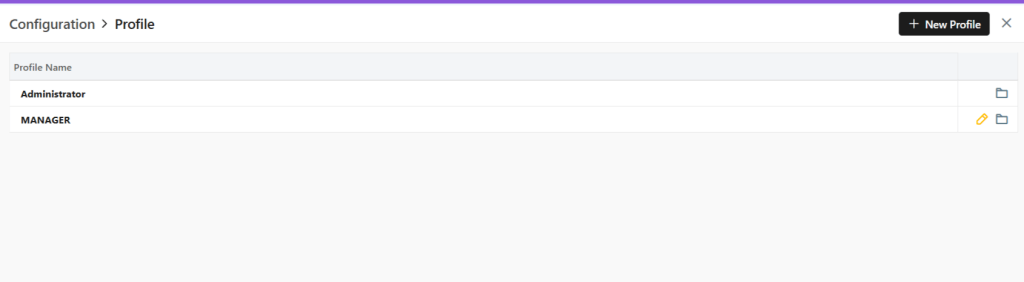
You will be able to view all the Profiles as shown in the image below.
Two default Profiles are pre-loaded in the system- Administrator and Manager.
The Administrator is the CEO. This profile cannot be updated or deleted in any way.
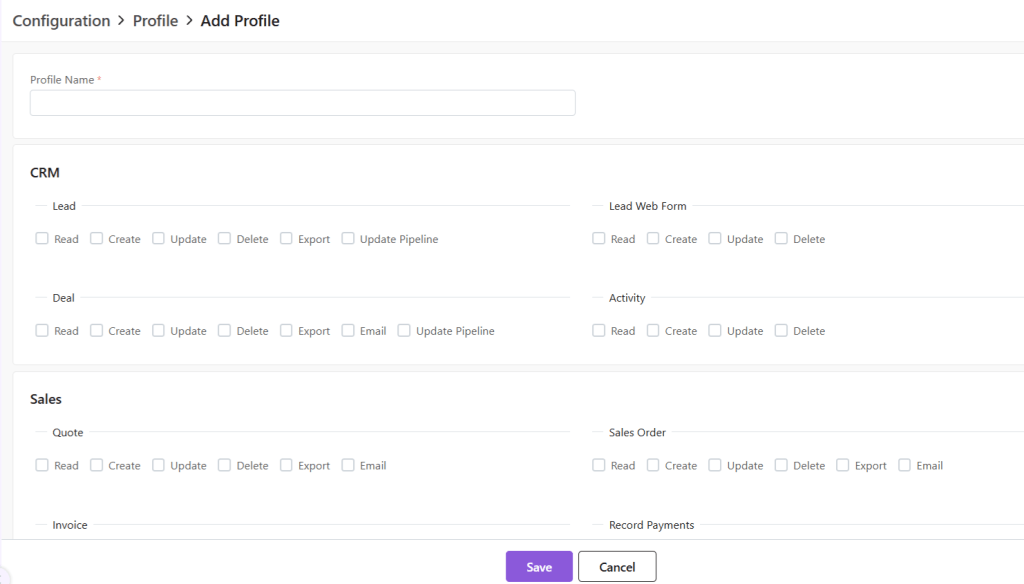
Add New Profile
Click on the “+ New Profile” button.
A new page will open.
Fill out the Profile name and click on the permissions to be provided to the said Profile.
Click on Save to add Profile.
Default System Profiles
There are 2 default Profile, namely, Administrator and Manager.
The Administrator Profile cannot be edited.
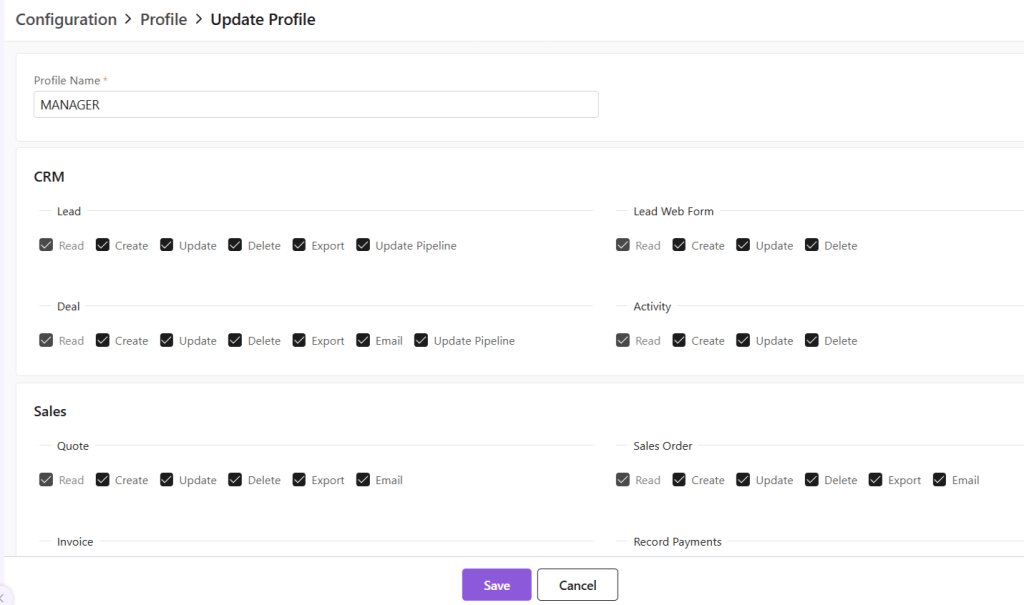
Update Existing Profile
To update a Profile, click on the yellow pen at the end of the Profile you want to edit.
A new page will open.
Update the permissions provided and click Save.
Click Save.
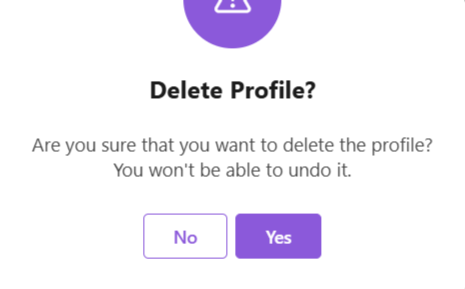
Delete Profile
To delete the Profile,
First click on the yellow pencil to go to Update view.
Now, click on “Delete Profile” at the bottom-right corner of the page.
Now, confirm you want to delete the role by clicking on Yes.
The role will be deleted.
Discover how Zhylar can streamline your sales and elevate your business processes. Visit our website or book a demo today to experience the difference!
Zhylar Overview: Essential Features of a Modern CRM System
Introduction
Zhylar is a user-friendly, web-based CRM and CPQ platform built to make selling easier. It helps businesses work faster, with fewer mistakes, while keeping customers happy. From finding new leads to sending invoices and getting paid — Zhylar streamlines every step.
Our solution manages your entire sales lifecycle. It covers everything from the first conversation with a customer to closing the deal. We also handle sending the invoice and tracking payment.
For CEOs: Get real-time sales insights to make strategic decisions and grow revenue.
For Managers: Monitor team performance, track deals, and keep sales operations running smoothly in one place.
For Sales Teams: Send accurate quotes instantly, personalise offers for customers, and see a complete history of every interaction.
Zhylar also reduces errors in pricing and documentation. It ensures compliance with policies. It integrates with your existing tools for a smooth transition.
What is CRM (Customer Relationship Management)?
CRM stands for Customer Relationship Management. It includes practices, strategies, and technologies. Companies use these to manage and analyze customer interactions and data throughout the customer life cycle. The goal of CRM is to improve business relationships with customers, aid in customer retention, and drive sales growth.
Understanding Basic Terminologies
Basic terminologies are the foundation for understanding and using any system effectively. For first-time users, they provide a starting point to grasp core concepts. While using Zhylar, understanding these terms is vital for customization, such as adding fields or integrating with other systems. This knowledge ensures the system aligns with business needs.
Let us understand them in more detail below.
Activities
Things you or your team do, like calls, meetings, or follow-ups.
Analytics
Dashboards and reports that show what’s working in sales and where improvements are needed.
Automation
Actions your CRM does for you automatically, like sending an email when a deal reaches a certain stage.
Workflows
Pre-set sequences that happen automatically when conditions are met, like sending a welcome email to a new lead. They also enable processes to be more efficient since they minimize work that involves non-complex manual actions.
Fields
Bits of information in a record, like Name, Email, or Company.
Custom Fields
Extra fields you add to store information unique to your business.
Dashboards
Visual snapshots of key sales numbers and performance.
Hierarchy
The way access and visibility are set based on user roles. These are often organized in levels of record visibility. Users in lower levels of the hierarchy cannot access data. This data belongs to users in the higher levels of the hierarchy.
Roles & Permissions
Who can see or edit what inside the CRM. Roles define the functions a user can perform. Permissions determine who can act and what actions can be taken on specific data or modules.
Stages
Steps a deal / Lead goes through in your sales pipeline.
Tasks
To-dos assigned to team members related to leads or companies.
Team Pipelines
Customisable pipelines that manage deals for the whole team.
Integrations
Links between your CRM and tools like email, social media, or accounting software.
Due Date
Date on which the payment for invoice issued to customer is due.
Companies
Businesses your contacts belong to.
Contacts
People you interact with in those companies.
Leads
People or businesses interested in your product.
Deals
Sales opportunities tracked from the first negotiation until closing.
Quotes
Estimates provided to clients highlighting the pricing for products & services
Sales Orders
Document generated to highlight product & services to be delivered to the customers
Invoice
Document generated to invoice product & services delivered to the customers
Receivables
Payment pending to be received from customer against the product & services delivered to them.
Reports
Synthesis and evaluations of data and information compilations with emphasis on determining effectiveness or physical achievement levels. These also help resolve critical issues within an organization.
Discover how Zhylar can streamline your sales and elevate your business processes. Visit our website or book a demo today to experience the difference!
Zhylar is your one-stop Customer Relationship Management (CRM) + Configure, Price, Quote (CPQ) solution. We are the only cutting-edge SaaS product that provides CRM and CPQ solutions all in one. This helps you reduce costs, improve workflow and organize your enquiry to invoice process all in one place.
First, let us understand the importance of CRM solutions. Before we move on to learn more about why you should choose Zhylar for your sales processes. Then we will explore why CPQ solutions are crucial for any growing business.
Importance of CRM and CPQ Systems
CRM and CPQ systems are important, rather indispensable tools for all modern-day businesses in sales-driven organizations. CRM focuses on managing customer relationships and streamlining interactions. CPQ enhances the quoting and sales process. It simplifies product configuration and pricing, and it aids in creating quotes. Together, they create a powerful synergy that streamlines efficiency, boosts sales and improves overall customer experience.
By itself, CRM systems provide a single database for all customer information. This includes contacts, past interactions, and sales history. This centralization allows sales teams to have a comprehensive view of each customer, enabling personalized and efficient engagement. CRM helps businesses manage relationships at every stage of the customer lifecycle—from lead generation to post-sale support.
When it comes to CPQ, for businesses with complex products or services, CPQ simplifies configuring the right product mix. Sales teams can easily customize offerings based on customer needs, ensuring that quotes are accurate and aligned with customer expectations. Additionally, CPQ systems can provide valuable insights into sales performance and customer preferences, helping businesses make data-driven decisions to optimize their product offerings and pricing strategies
Integrated CRM and CPQ
When CRM and CPQ are integrated, they create a seamless flow from lead management to quote creation. CRM manages the relationship and pipeline, while CPQ handles product configuration and pricing. Together, they:
Increase revenue by streamlining the sales process. Reduce errors in quoting. This leads to more closed deals and higher customer retention rates.
Enhance collaboration between sales, marketing, and product teams. Provide a centralized platform for sharing customer information. Share product details and pricing data on this platform.
Enable data-driven decision-making by tracking customer interactions, quote history, and sales performance metrics in one integrated system.
This is where Zhylar comes into play!
How Does Zhylar Solve Your CRM + CPQ Needs?
As aforementioned, Zhylar provides integrated CRM and CPQ solutions. These solutions simplify and consolidate your tasks in one place. Furthermore, Zhylar’s competitive pricing is very easy on your pockets and provides 2 solutions at the cost of one.
Don’t believe us? Check it out in the section below.
Why Choose Zhylar?
There are many reasons why Zhylar is your go-to CRM+ CPQ product.
Only SaaS product offering CRM+ CPQ solution all in one!
Competitive price offering 2 solutions at the price of one.
Easy-to-use user-friendly interface.
All-time suppport available.
Let’s Talk Numbers!
From one business to another, at the end of the day, it’s all about numbers. Take a look at our product pricing to understand how Zhylar is your cost-effective solution.
Tiers Name
Freemium
Basic
Standard
Premium
Yearly Price
$-
$14
$20
$30
Diff Yearly – Monthly
25%
25%
25%
25%
Monthly Price
$-
$18
$25
$38
Users
2 Users
Price / User
Price / User
Price / User
Parameters & Features
CRM Essential
Leads
Y
Y
Y
Y
Deals
Y
Y
Y
Y
Customer/Contacts
Y
Y
Y
Y
Sales Pipeline
1 Pipeline/Org
1 Pipeline/Org
3 Pipeline/Org
5 Pipeline/Org
Web Forms to capture leads
Y
Y
Y
Y
Custom Web Forms
N
N
2
5
Reporting & Insights
Y
Y
Y
Y
Sales Essential
Product Catalog
Y
Y
Y
Y
Simple Units of Measure
Y
Y
Y
Y
Quotes
Y
Y
Y
Y
Sales Order
Y
Y
Y
Y
Invoice
Y
Y
Y
Y
Customer/Contacts
Y
Y
Y
Y
Attachment in documents
N
N
N
3 MB/ Document
Line items / Quotes, Sales order, Invoice
10-line items/ Quotes, SO, Invoice
20-line items/ Quotes, SO, Invoice
30-line items/ Quotes,SO,Invoice
50-line items/ Quotes,SO,Invoice
Data
Number of Records
500 / Org
20000 / Org
50000 / Org
100000 / Org
File Storage
–
1 GB / Org
1 GB / Org
2 GB / Org
Data Backup (No of backup to be taken monthly)
–
1/Month
2/Month
2/Month
Data Import (No of records to be imported per batch)
50 Records/Batch
150 Records/Batch
300 Records/Batch
500 Records/Batch
Data Export
50 Records/Batch 2 Export/Day/Org
5000 Records/Batch 5 Export/Day/Org
10,000 Records/Batch 10 Export/Day/Org
20,000 Records/Batch 15 Export/Day/Org
Integrations
Email, Calendar & Contact sync
O365
N
N
N
Y
Gsuite
N
N
N
Y
Attachment Size
1 MB / Email
1 MB / Email
1 MB / Email
5 MB / Email
Emails
1 Email/Day *License /Org/month
20 Email/Day *License /Org/month
30 Email/Day *License /Org/month
50 Email/Day *License /Org/month
Accounting Integration
QuickBooks
N
N
N
Y
Zoho Books
N
N
N
Y
Tally
N
N
N
Y
Amazon-Business
N
N
N
Y
Social Media Integrations
Facebook
N
N
N
Y
Instagram
N
N
N
Y
Linkden
N
N
N
Y
Google Ads
N
N
N
Y
Advance features
Combined Units of Measure
N
N
Y
Y
Multicurrency
N
N
5 Currency / Org
10 Currency/Org
Sales Forecast
N
N
2 Sales Forecast/Org
5 Sales Forecast/Org
Custom Email Template
N
Y
Y
Custom Document Template
N
Y
Y
Y
Custom Dashboard
N
N
Y
Y
Subscribe to get access
Read more of this content when you subscribe today.