
Quote revision lets you update or modify an existing quote when customer requirements change. You don’t need to start from scratch. You can duplicate the original quote and adjust it. This keeps track of all versions in one place. This ensures transparency, faster negotiations, and makes it easier to finalise and convert the approved quote into a sales order.
In the Zhylar system, please note:
- Only a quote in sent stage can be revised.

- Open Sent quote
- Click Create Revision
- Make changes
- Update Quote (save draft)
- Save & Send (resend)
- Revised versions will be denoted by R# following the document series code.
- E.g., quote document with ID QT-0007 is revised thrice, the revised documents will be saved as:
- QT-0007- R1
- QT-0007-R2
- QT-0007- R3

- Quotes List View only shows the latest active version. Example: Accepted/Sent quotes appear.
- All other versions will be moved to archive.
- You can switch between quote versions in Quotes View tab.
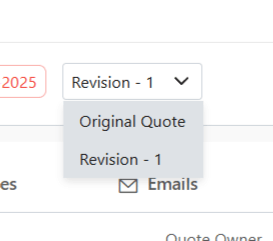
- To see all versions:
- Go to Companies.
- Click the relevant company.
- Select the Quotes tab.
- View all versions in list view
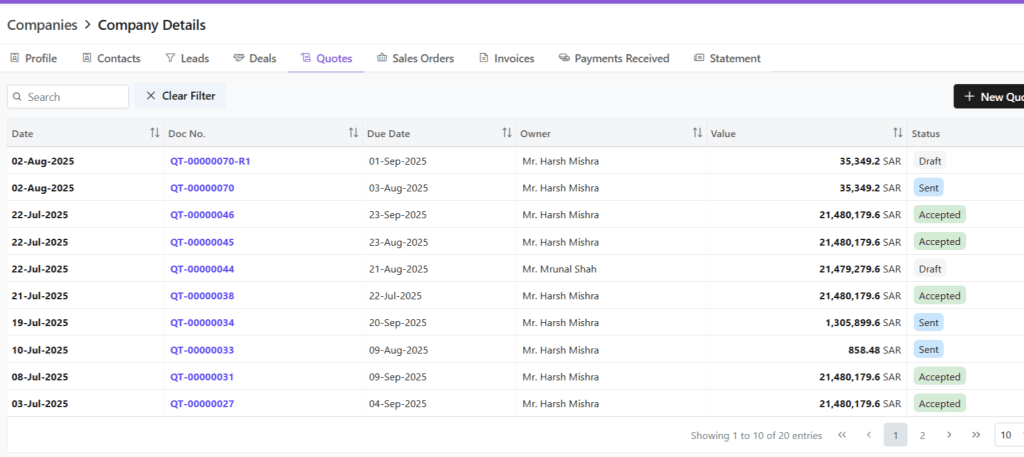
- This is done to avoid clutter in main list.
Discover how Zhylar can streamline your sales and elevate your business processes. Visit our website or book a demo today to experience the difference!
Also Read
Sales Orders
 Zhylar Blog
Leave a comment